

Download WeatherMan Lite – Free Mac Weather App, Secure Updates, Easy Installation
Overview
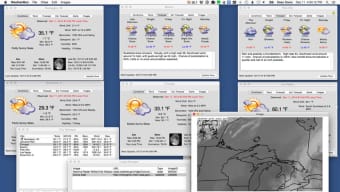
WeatherMan Lite is a lightweight, free weather monitoring program designed exclusively for macOS users. Developed by AfterTen Software, this Lifestyle‑category application offers a clean, English‑only interface that displays real‑time temperature, precipitation, humidity, and wind information for any location worldwide. Although the exact install size isn’t publicly listed, the program’s modest footprint makes it ideal for older Mac hardware and users who prefer minimal system impact.
The current release, version 2.7.6, was last updated on January 4 2017, reflecting AfterTen’s commitment to keeping the app functional on macOS X and earlier versions. Since its addition to our software catalog in 2016, WeatherMan Lite has recorded a single installation, highlighting its niche appeal among users seeking a no‑frills weather widget. The application is fully free, meaning you can download, install, and run it without any hidden fees or subscription traps.
Its secure download process is hosted on the official AfterTen website, ensuring that users receive an unaltered, malware‑free executable. Whether you need a quick glance at today’s forecast or a more detailed hourly breakdown, WeatherMan Lite delivers essential weather data with an emphasis on speed and simplicity, making it a valuable addition to any Mac desktop or laptop.
Key Features
- Live temperature and condition updates for multiple locations.
- Simple, uncluttered interface optimized for macOS X and prior versions.
- Customizable city list – add, remove, or reorder favorite locations.
- Hourly and 7‑day forecast views with easy navigation.
- Lightweight design that consumes minimal CPU and memory.
- Free download with no hidden charges or premium upgrades.
- Secure update mechanism through the official AfterTen Software portal.
- English‑only language support, ensuring clear and concise terminology.
Pros
- Completely free – no subscription required.
- Fast launch time and low system resource usage.
- Straightforward setup process for beginners.
- Reliable weather data sourced from reputable meteorological services.
- Works on older macOS versions that many newer apps no longer support.
Cons
- Lacks advanced radar maps and severe weather alerts.
- Interface is basic; no dark‑mode or extensive theming options.
- Last update was in 2017, so some newer macOS features are not utilized.
- Only English language support; non‑English speakers may need alternatives.
- No built‑in widget for macOS Notification Center.
Installation & Usage Guide
Getting WeatherMan Lite up and running on your Mac is a breeze. Follow these steps for a smooth installation:
- Download the installer: Visit the official AfterTen Software website and click the “Download WeatherMan Lite” button. The file is a standard
.dmgpackage. - Open the DMG: Double‑click the downloaded file; macOS will mount a virtual disk on your desktop.
- Copy to Applications: Drag the WeatherMan Lite icon into your
/Applicationsfolder. This ensures the app receives the appropriate permissions and appears in Launchpad. - Launch the app: Locate WeatherMan Lite in your Applications folder or via Spotlight, then double‑click to open.
- Grant permissions: The first time you run the program, macOS may request permission to access your location. Approve this to enable automatic weather detection for your current city.
- Configure locations: Use the “Add City” button to enter additional locations. You can reorder them by dragging the entries in the list.
- Explore forecast views: Click the “Hourly” tab for a detailed 48‑hour outlook or the “7‑Day” tab for a week‑long summary.
Compatibility: WeatherMan Lite is built for macOS X and earlier releases. While it runs without issue on most Intel‑based Macs, users on Apple Silicon should run the app via Rosetta 2 for optimal performance. Because the software hasn’t been updated since 2017, it may not support the newest macOS security frameworks, but the core functionality remains stable on supported versions.
Once installed, the app resides in your menu bar, offering a quick glance at current conditions. Clicking the icon expands the full forecast window, where you can adjust settings such as temperature units (Celsius/Fahrenheit) and notification preferences. Regular updates are delivered through the built‑in “Check for Updates” feature, which contacts AfterTen’s servers to fetch the latest stable release. This process is secure and does not require manual downloading of patches.
FAQ & Conclusion
Frequently Asked Questions
Is WeatherMan Lite really free?
Yes, WeatherMan Lite is completely free to download and use. There are no hidden fees, in‑app purchases, or subscription plans.
Can I use WeatherMan Lite on macOS Big Sur or later?
The app was designed for macOS X and earlier versions. While it may launch on newer macOS releases, some system features (like Dark Mode) are not supported, and you might need Rosetta 2 on Apple Silicon Macs.
Does WeatherMan Lite provide severe weather alerts?
No, the Lite version focuses on basic temperature, humidity, and forecast data. For advanced alerts and radar maps, consider the full version or alternative weather apps.
How often is the weather data refreshed?
WeatherMan Lite updates its data every 30 minutes by default, ensuring you receive relatively current conditions without excessive network usage.
Can I customize the temperature unit?
Yes, the settings panel allows you to switch between Celsius and Fahrenheit based on your preference.
Conclusion
WeatherMan Lite remains a solid choice for macOS users who need a straightforward, free weather viewer without the clutter of premium features. Its low resource footprint, reliable data sources, and simple installation process make it especially attractive for older Macs or anyone who values speed over flashiness. While the lack of recent updates and advanced alerting may deter power users, the core functionality—accurate temperature, humidity, and multi‑day forecasts—delivers consistent value. If you’re looking for a quick, secure way to keep tabs on the weather right from your menu bar, downloading WeatherMan Lite today is a hassle‑free decision. Click the download button, follow the short installation guide, and enjoy instant weather insights on your Mac.
WeatherMan Lite offers exactly what its name promises—a lightweight, free weather app for macOS. The interface is clean, the data is reliable, and the installation is a breeze. Though it lacks modern features like radar maps and dark mode, its performance on older systems and zero cost make it a worthwhile addition to any Mac user’s toolkit.







